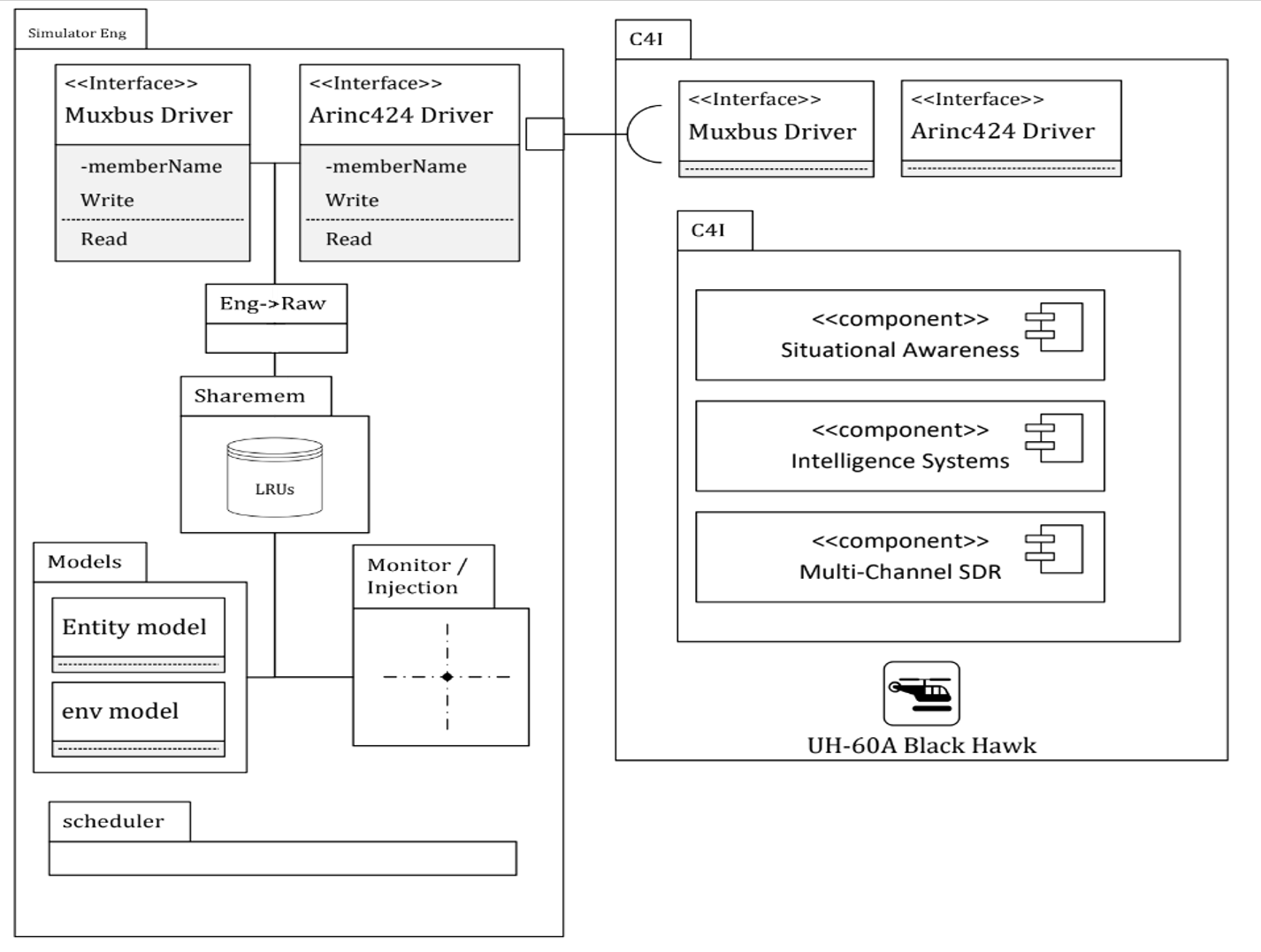
The Core Engine package
Welcome to the Core Engine, a high-performance real-time simulation framework designed for deterministic execution, predictable timing, and accurate model behavior. This guide walks you through the basic concepts, setup steps, and core workflow needed to start building simulations.
What Is the Core Engine?
The Core Engine is a modular real-time execution system that runs simulations in fixed-rate frames, allowing you to:
- Execute logic at a precise refresh rate (e.g., 1 kHz)
- Handle real-time data recording and playback
- Schedule frame-based tasks deterministically
- Integrate external models, hardware, or I/O systems
- Guarantee low-jitter and strict timing control
- It is used for embedded simulation, signal generation, hardware-in-the-loop (HIL), control-loop testing, and high-frequency data processing.
System Requirements
- Windows or Linux
-
Recommended:
- CPU with stable TSC
- Real-Time priority enabled
- High-resolution timers
- PREEMPT_RT kernel (Linux) or MMCSS (Windows)
- C++ compiler with CMAKE support
- C++14 or newer
Core Concepts
The Core Engine is built around a deterministic real-time loop that executes simulation logic in fixed, predictable intervals. To understand how to write stable, high-performance simulation modules, it’s essential to know the core components and how they interact. This chapter explains the most important systems within the Core Engine.
Frame Loop (Real-Time Engine)
At the heart of the Core Engine is the Frame Loop, a high-precision, fixed-period execution cycle. Every frame represents one “tick” of simulation time, and all simulation logic runs inside these ticks.
How the frame loop behaves
- The engine sleeps/spins until the next frame start.
- Executes all tasks registered for this frame.
- Processes recording/IO operations.
- Reports timing information.
- Returns to waiting for the next frame boundary.
This produces a stable “heartbeat” for your simulation.
Why this matters
This is the central part of the engine where your logic runs. The Work Section is executed once every frame and should contain all time-critical operations:
- Time-critical algorithms (filters, integrators, controllers) require stable sampling intervals.
- Hardware interfaces depend on consistent frame timing.
- Deterministic behavior enables repeatable simulations and reliable debugging.
Work Section (User Simulation Code)
- Work Section – All simulation logic divided to models and states components
- Interface Section – I/O Send & Receive from External Interfaces
- Recording / Data Exchange
- Timing Control – Busy wait or sleep to maintain exact frame rate
Rules for Work Section code
- Keep it short and deterministic
- No dynamic memory allocations (new, malloc, vector push_back)
- No disk access
- Avoid locks unless absolutely necessary
- Absolutly Avoid slow/logging functions (printf, std::cout)
- Pre-allocate buffers and reuse them
- Avoid unpredictable branching and large loops, use buildin state machine
ou can think of the Work Section as a “real-time ISR”—fast, predictable, and isolated.
Scheduler
The Scheduler is responsible for managing and executing tasks during each simulation frame.
What the Scheduler does
- Keeps a list of registered tasks/functions
- Calls them in a deterministic order
- Passes the current frame ID to every task
- Allows tasks to be dynamically enabled/disabled
- Ensures modular separation of simulation components
Types of tasks
The Scheduler typically contains:
- Core tasks — system internal tasks
- User tasks — defined by the simulation developer
- I/O tasks — network or device interactions
- Recording tasks — data capture
Engine States
The Core Engine has a simple but effective state machine:
| State | Meaning |
|---|---|
| Run | Continuous real-time execution |
| Step | Execute exactly one frame and then pause |
| Stop | Terminate simulation immediately |
| Init | Send Init signal to all the Drivers and the Models |
| Reset | Reset All IO drivers and send Reset signal to all Models |
Multi-Threading Model
Although the Frame Loop is single-threaded for determinism, the engine internally may use additional threads:
Main threads
- Frame Loop Thread
- Recording Thread
- Refletion Thread
- Network commands Thread
- Stream I/O Threads
- User defined long async tasks
This ensures high-frequency simulation execution is not blocked by slower tasks like disk I/O.
Example of Core Engine App design
The following is an example of an AH-60 device development setup.